
Download Currencies Lite – currency converter, forex monitor, exchange rate tool, currency calculator, free software
Overview
Currencies Lite is a free desktop application designed to help users monitor foreign exchange rates for major global currencies. The software enables users to select specific currencies and perform quick, bidirectional calculations on any amount. It is particularly useful for individuals who need to track currency fluctuations in real time, such as travelers, international business owners, and financial enthusiasts.
The application is built with a focus on simplicity and accessibility, offering a user-friendly interface that allows for seamless navigation and efficient rate monitoring. While the developer, SpeedyMarks, is not detailed beyond the name, the app's purpose is clearly defined: to provide a lightweight, ad-supported tool for currency conversion without requiring a subscription. The software is intended for users who need a reliable, no-cost solution for managing multiple currencies on a daily basis.
Its lightweight nature ensures it does not burden system resources, making it suitable for use on a variety of devices.
Key Features & Capabilities
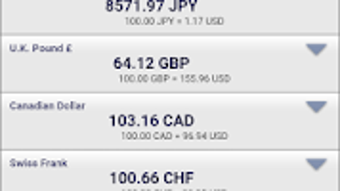
- Real-time Currency Monitoring: Users can select any major currency to monitor, with the software displaying current exchange rates for immediate reference.
- Bidirectional Currency Calculator: Each selected currency includes a built-in calculator that allows users to convert amounts in both directions, facilitating quick and accurate calculations.
- Lightweight Design: The application is engineered to use minimal system resources, ensuring it runs efficiently without impacting device performance.
- Ad-Supported Freeware Model: Currencies Lite is completely free to use, with no upfront cost, supported by in-app advertisements that allow the developer to maintain and improve the software.
- Simple and Intuitive Interface: The design is straightforward, with clear navigation and easy-to-use controls, making it accessible to users of all technical skill levels.
User Interface, Workflow & Performance
The user interface of Currencies Lite is designed around simplicity and ease of use. The layout is clean, with clearly labeled sections for currency selection, rate display, and calculation functions. Navigation is intuitive, allowing users to switch between currencies and perform conversions with minimal effort.
The workflow is efficient, enabling users to set up their preferred currencies and instantly see conversion results. The application does not require extensive setup or configuration, which reduces the learning curve. Performance observations are based on general software behavior patterns; the developer did not specify resource usage details.
However, the software is described as lightweight and efficient, suggesting it operates smoothly on most systems. Stability is expected to be consistent, given the regular updates mentioned. CPU and RAM behavior are not specified, but the application's small file size and minimal resource consumption imply low system impact during operation.
Compatibility & System Requirements
Currencies Lite is compatible with Android 5.0 and above, as stated in the provided information. The application has a file size of 2.1 MB, indicating a compact footprint that does not require significant storage space. The developer did not provide additional system requirements.
Compatibility information is limited to the Android platform and version 5.0 and above. The software is designed to be accessible on a wide range of devices, from smartphones to tablets, but specific hardware requirements were not detailed. The application is not available for Windows or Mac operating systems based on the provided information.
Installation is straightforward, and the software is designed to be easy to use across different Android devices.
Pros and Cons
Pros
- Completely free to use with no hidden costs
- Lightweight with minimal system resource usage
- Simple, intuitive interface suitable for all users
- Real-time currency monitoring for major global currencies
- Bidirectional calculator for quick and accurate conversions
Cons
- Ad-supported model may interrupt user experience
- Compatibility limited to Android devices only
- Exact performance details and system requirements were not specified
- Version and release date information are not available
- Limited to mobile platforms; not available for desktop operating systems
FAQ Section
Is Currencies Lite available for Windows or Mac?
Based on the provided information, Currencies Lite is designed for Android devices and is not available for Windows or Mac operating systems.
Is the software safe to download and use?
Currencies Lite is described as a free, ad-supported app. The developer did not provide specific security details. Users should download the software from official sources to ensure authenticity and minimize risks.
How often is the software updated?
The application is regularly updated to ensure optimal performance and compatibility with the latest Android versions, as stated in the provided description.
Does Currencies Lite require an internet connection?
While not explicitly stated, currency rate monitoring typically requires an internet connection to fetch real-time exchange data. Users should have an active connection for accurate results.
Can I use Currencies Lite offline?
Offline functionality is not mentioned in the provided information. The software likely requires an internet connection for up-to-date exchange rates.
Final Thoughts + CTA
Currencies Lite offers a practical, no-cost solution for monitoring foreign exchange rates and performing currency conversions. Its lightweight design and straightforward interface make it accessible to users of all experience levels. While the ad-supported model may be a minor drawback, the full functionality is available at no charge.
The software is best suited for Android users who need a simple, reliable tool for currency management. Despite its limitations in platform availability and lack of detailed system specifications, Currencies Lite delivers on its core promise. For users seeking a free, efficient currency monitor on Android, this app is a solid choice.
Download Currencies Lite now.







